
Ambari中的custom_actions应用实例分析
Ambari中的custom_actions应用实例分析,很多新手对此不是很清楚,为了帮助大家解决这个难题,下面小编将为大家详细讲解,有这方面需求的人可以来学习下,希望你能有所收获。
1. custom_actions简单介绍
假如我们要在ambari的所有主机执行某个脚本,要在每个主机创建一个用户或者查询所有主机用户,我们可以怎么做呢?
在ambari的安装路径/var/lib/ambari-server/resources/custom_actions/scripts/有各种已有脚本如下:
$ ll /var/lib/ambari-server/resources/custom_actions/scripts/*.py-rwxr-xr-x 1 root root 25331 Jul 27 21:44 check_host.py-rwxr-xr-x 1 root root 2221 Jul 27 21:44 clear_repocache.py-rwxr-xr-x 1 root root 21891 Jul 27 21:44 install_packages.py-rwxr-xr-x 1 root root 2370 Jul 27 21:44 remove_bits.py-rwxr-xr-x 1 root root 4891 Jul 27 21:44 remove_previous_stacks.py-rwxr-xr-x 1 root root 5947 Jul 27 21:44 ru_execute_tasks.py-rwxr-xr-x 1 root root 4592 Jul 27 21:44 stack_select_set_all.py-rwxr-xr-x 1 root root 2777 Jul 27 21:44 update_repo.py-rwxr-xr-x 1 root root 12374 Jul 27 21:44 validate_configs.py
我们同样可以添加一个custom_action来为我们执行某些特定操作
custom_action scritpts结构如下:
定义一个类,任意命名
类要继续Script
类中重写方法actionexecute,方法中是我们可以自定义的操作
#!/usr/bin/env pythonclass CheckHost(Script): def actionexecute(self, env): pass if __name__ == "__main__": CheckHost().execute()
2. 案例: custom_actions实现所有主机用户管理
2.1 custom_action脚本实现
实现脚本并添加至路径/var/lib/ambari-server/resources/custom_actions/scripts/
注意脚本需要执行权限chmod a+x populate_user.py
populate_user.py
#!/usr/bin/pythonfrom resource_management import Script, formatfrom resource_management.core import shellfrom resource_management.core.logger import Loggerclass UserManager(Script): originalUserList = "" requestUserList = "" def actionexecute(self, env): Logger.info("UserManager invoked to processing account request") config = Script.get_config() structured_output = {} request_info = config['roleParams'] Logger.debug("request details:" + str(request_info)) code, cmd = self.assemble_cmd(request_info) if 0 != code: print "invalid request info", cmd Logger.error(str(code) + " " + cmd) structured_output["user_manager"] = {"exit_code": code, "message": str(request_info), "output": format(cmd)} self.put_structured_out(structured_output) return Logger.info("to execute:" + cmd) code, output = shell.call(cmd, sudo=False) print code, output if 0 == code: structured_output["user_manager"] = {"exit_code": 0, "message": format("populate user account successfully"), "output": format(output)} else: Logger.error(str(code) + " " + output) structured_output["user_manager"] = {"exit_code": code, "message": format("populate user account failed"), "output": format(output)} self.put_structured_out(structured_output) def is_user_existed(self, uname): # retrieveUser = "cat /etc/passwd | grep /bin/bash| cut -d: -f1" uexisted = 'id ' + uname code, resp = shell.call(uexisted, sudo=False) if 0 != code: Logger.error(str(code) + " " + resp) return False else: return True def is_group_existed(self, group): check_group_cmd = "cat /etc/group|cut -d : -f1" code, resp = shell.call(check_group_cmd, sudo=False) groupls = group.split(",") respls = [] if code == 0: grps = resp.split("\n") # Logger.info("/etc/group:"+",".join(grps)) for g in groupls: if g not in grps: respls.append(g) else: Logger.error(str(code) + " " + resp) return False, "cmd execute error:" + resp if len(respls) > 0: return False, "groups:" + ",".join(respls) + " not existed" else: return True, "groups has existed" def assemble_cmd(self, req): """ Json example for create user/group, delete user/group {"action":"create","type":"group","group":"hdp1"} {"action":"delete","type":"group","group":"hdp1"} {"action":"search","type":"group"} {"action":"create","type":"user","group":"hdp1","name":"user1","password":"passwd"} {"action":"delete","type":"user","group":"hdp1","name":"user1"} {"action":"search","type":"user"} {"action":"search","type":"user_groups"} parse json data to assemble instruction """ type = req['type'] action = req['action'] # search if action == "search" and type == "user": return self.search_user() if action == "search" and type == "group": return self.search_group() if action == "search" and type == "user_groups": return self.search_user_groups() # check user or group if type == 'group': gname = req['group'] if gname is None or gname == '': code = 1 cmd = "group name missed" return code, cmd elif type == 'user': uname = req['name'] if uname is None or uname == '': code = 1 cmd = "user name missed" return code, cmd else: code = 1 cmd = "unsupported type" return code, cmd # create/delete/edit if action == "create" and type == "user": return self.create_user(req['name'], req['group']) if action == "delete" and type == "user": return self.delete_user(req['name']) if action == "edit" and type == "user": return self.edit_user(req['name'], req['group']) if action == "create" and type == "group": return self.create_group(req['group']) if action == "delete" and type == "group": return self.delete_group(req['group']) if action == "edit" and type == "group": self.edit_group(req['new_group'], req['group']) # unknown return 1, "unknown operation request" def create_user(self, uname, gname): code = 0 # need to determine whether user existed already if self.is_user_existed(uname): code = 2 cmd = "user already existed" return code, cmd if gname is None or gname == '': code = 1 cmd = "group name missed when creating user" return code, cmd is_grp_existed, grp_resp = self.is_group_existed(gname) if not is_grp_existed: code = 1 cmd = grp_resp return code, cmd cmd = 'useradd -m -g ' + gname + " -s /bin/bash " + uname return code, cmd def delete_user(self, uname): code = 0 # check whether user existed if not self.is_user_existed(uname): code = 3 cmd = "user not existed" return code, cmd cmd = 'userdel -r ' + uname return code, cmd def edit_user(self, uname, gname): code = 0 if not self.is_user_existed(uname): code = 3 cmd = "user not existed" return code, cmd is_grp_existed, grp_resp = self.is_group_existed(gname) if not is_grp_existed: code = 1 cmd = grp_resp return code, cmd cmd = 'usermod -G ' + gname + ' ' + uname return code, cmd def search_user(self): # search all users cmd = 'compgen -u' return 0, cmd def create_group(self, gname): cmd = 'groupadd ' + gname return 0, cmd def delete_group(self, gname): cmd = 'groupdel ' + gname return 0, cmd def edit_group(self, new_gname, old_gname): cmd = 'groupmod -n ' + new_gname + ' ' + old_gname return 0, cmd def search_group(self): # search all groups cmd = 'compgen -g' return 0, cmd def search_user_groups(self): """ search all users and user_groups :return: hbase : hbase hadoop """ cmd = "for u in `compgen -u`;do groups $u; done" return 0, cmdif __name__ == "__main__": UserManager().execute()2.2 添加定义到system_action_definitions.xml
在/var/lib/ambari-server/resources/custom_action_definitions/system_action_definitions.xml中添加custom_action的定义
populate_user SYSTEM Populate user account ALL HOST.ADD_DELETE_COMPONENTS, HOST.ADD_DELETE_HOSTS, SERVICE.ADD_DELETE_SERVICES
2.3 重启ambari-server并测试
$ ambari-server restart
2.3.1 查看action是否添加成功
可以看到已经有了我们添加的populate_user
$ curl -X GET -u admin:admin 'http://10.1.255.11:8080/api/v1/actions
{ "href" : "http://10.1.255.11:8080/api/v1/actions", "items" : [ { "href" : "http://10.1.255.11:8080/api/v1/actions/check_host", "Actions" : { "action_name" : "check_host" } }, { "href" : "http://10.1.255.11:8080/api/v1/actions/clear_repocache", "Actions" : { "action_name" : "clear_repocache" } }, { "href" : "http://10.1.255.11:8080/api/v1/actions/install_packages", "Actions" : { "action_name" : "install_packages" } }, { "href" : "http://10.1.255.11:8080/api/v1/actions/populate_user", "Actions" : { "action_name" : "populate_user" } }, { "href" : "http://10.1.255.11:8080/api/v1/actions/remove_previous_stacks", "Actions" : { "action_name" : "remove_previous_stacks" } }, { "href" : "http://10.1.255.11:8080/api/v1/actions/ru_execute_tasks", "Actions" : { "action_name" : "ru_execute_tasks" } }, { "href" : "http://10.1.255.11:8080/api/v1/actions/update_repo", "Actions" : { "action_name" : "update_repo" } }, { "href" : "http://10.1.255.11:8080/api/v1/actions/validate_configs", "Actions" : { "action_name" : "validate_configs" } } ]}2.3.2 通过自定义脚本查询所有主机用户
请求执行populate_user
$ curl -X POST 'http://10.1.255.11:8080/api/v1/clusters/dp147/requests/' \ -u admin:admin \ -H 'x-requested-by: ambari' \ --data '{ "RequestInfo": { "context": "UserManager 2020.12.23 13:45:14", "action": "populate_user", "parameters/type": "user", "parameters/action": "search" } }' # 响应 { "href" : "http://10.1.255.11:8080/api/v1/clusters/dp147/requests/968", "Requests" : { "id" : 968, "status" : "Accepted" }}查看populate_user执行结果
# curl -X GET -u admin:admin 'http://10.1.255.11:8080/api/v1/clusters/dp147/requests/968'{ "href" : "http://10.1.255.11:8080/api/v1/clusters/dp147/requests/968", "Requests" : { "aborted_task_count" : 1, "cluster_host_info" : "{}", "cluster_name" : "dp147", "completed_task_count" : 3, "create_time" : 1608732220935, "end_time" : 1608732221608, "exclusive" : false, "failed_task_count" : 0, "id" : 968, "inputs" : "{\"action\":\"search\",\"type\":\"user\"}", "operation_level" : null, "progress_percent" : 100.0, "queued_task_count" : 0, "request_context" : "UserManager 2020.12.23 13:45:14", "request_schedule" : null, "request_status" : "ABORTED", "resource_filters" : [ ], "start_time" : 1608732220999, "task_count" : 3, "timed_out_task_count" : 0, "type" : "ACTION", "user_name" : "admin" }, "stages" : [ { "href" : "http://10.1.255.11:8080/api/v1/clusters/dp147/requests/968/stages/0", "Stage" : { "cluster_name" : "dp147", "request_id" : 968, "stage_id" : 0 } } ], "tasks" : [ { "href" : "http://10.1.255.11:8080/api/v1/clusters/dp147/requests/968/tasks/2943", "Tasks" : { "cluster_name" : "dp147", "id" : 2943, "request_id" : 968, "stage_id" : 0 } }, { "href" : "http://10.1.255.11:8080/api/v1/clusters/dp147/requests/968/tasks/2944", "Tasks" : { "cluster_name" : "dp147", "id" : 2944, "request_id" : 968, "stage_id" : 0 } }, { "href" : "http://10.1.255.11:8080/api/v1/clusters/dp147/requests/968/tasks/2945", "Tasks" : { "cluster_name" : "dp147", "id" : 2945, "request_id" : 968, "stage_id" : 0 } } ]}查看populate_user在某台主机执行结果
$ curl -X GET -u admin:admin 'http://10.1.255.11:8080/api/v1/clusters/dp147/requests/968/tasks/2945'{ "href" : "http://10.1.255.11:8080/api/v1/clusters/dp147/requests/968/tasks/2945", "Tasks" : { "attempt_cnt" : 1, "cluster_name" : "dp147", "command" : "ACTIONEXECUTE", "command_detail" : "populate_user ACTIONEXECUTE", "end_time" : 1608732221597, "error_log" : "/var/lib/ambari-agent/data/errors-2945.txt", "exit_code" : 0, "host_name" : "host-10-1-236-147", "id" : 2945, "ops_display_name" : null, "output_log" : "/var/lib/ambari-agent/data/output-2945.txt", "request_id" : 968, "role" : "populate_user", "stage_id" : 0, "start_time" : 1608732221032, "status" : "COMPLETED", "stderr" : "None", "stdout" : "2020-12-23 22:03:41,453 - UserManager invoked to processing account request\n2020-12-23 22:03:41,453 - to execute:compgen -u\n2020-12-23 22:03:41,454 - call['compgen -u'] {'sudo': False}\n2020-12-23 22:03:41,532 - call returned (0, 'root\\nbin\\ndaemon\\nadm\\nlp\\nsync\\nshutdown\\nhalt\\nmail\\noperator\\ngames\\nftp\\nnobody\\navahi-autoipd\\nsystemd-bus-proxy\\nsystemd-network\\ndbus\\npolkitd\\nabrt\\nlibstoragemgmt\\npostfix\\npcp\\ntss\\nchrony\\nsshd\\nntp\\ntcpdump\\noprofile\\npuaiuc\\npostgres\\nyarn-ats\\nlivy\\nmysql\\nhive\\nzookeeper\\nams\\nambari-qa\\ntez\\nhdfs\\nyarn\\nmapred\\nhbase\\nttt\\ngaokang123\\nlibai\\nhunter\\nsongwukong\\nwwww\\njiazz')\n0 root\nbin\ndaemon\nadm\nlp\nsync\nshutdown\nhalt\nmail\noperator\ngames\nftp\nnobody\navahi-autoipd\nsystemd-bus-proxy\nsystemd-network\ndbus\npolkitd\nabrt\nlibstoragemgmt\npostfix\npcp\ntss\nchrony\nsshd\nntp\ntcpdump\noprofile\npuaiuc\npostgres\nyarn-ats\nlivy\nmysql\nhive\nzookeeper\nams\nambari-qa\ntez\nhdfs\nyarn\nmapred\nhbase\nttt\ngaokang123\nlibai\nhunter\nsongwukong\nwwww\njiazz\n\nCommand completed successfully!\n", "structured_out" : { "user_manager" : { "exit_code" : 0, "message" : "populate user account successfully", "output" : "root\nbin\ndaemon\nadm\nlp\nsync\nshutdown\nhalt\nmail\noperator\ngames\nftp\nnobody\navahi-autoipd\nsystemd-bus-proxy\nsystemd-network\ndbus\npolkitd\nabrt\nlibstoragemgmt\npostfix\npcp\ntss\nchrony\nsshd\nntp\ntcpdump\noprofile\npuaiuc\npostgres\nyarn-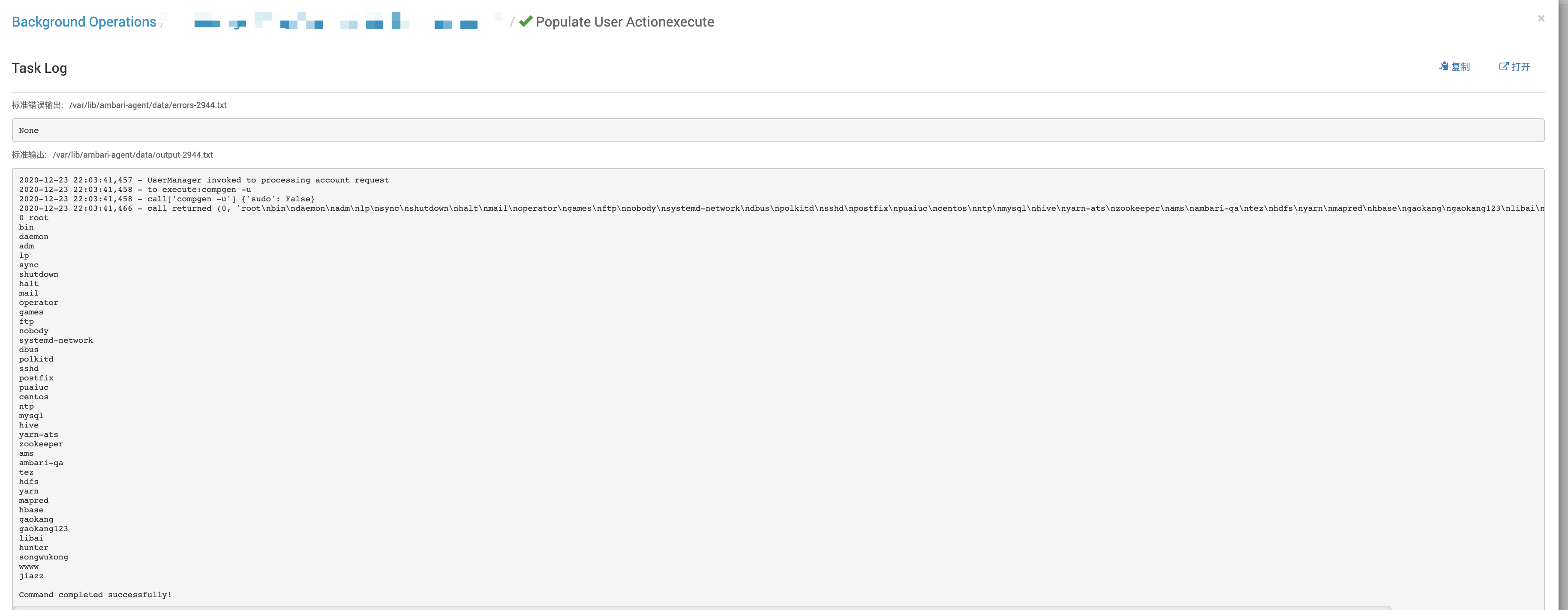\ngaokang123\nlibai\nhunter\nsongwukong\nwwww\njiazz" } } }}在ambari界面查看查看action运行进度如下:

看完上述内容是否对您有帮助呢?如果还想对相关知识有进一步的了解或阅读更多相关文章,请关注行业资讯频道,感谢您对的支持。

